100% local scan ยท extension list never uploaded ยท plain-English reasons

See what your extensions can access, in one click

Extension Trust Scanner reads your installed extension list, scores each one's permission footprint from 0 to 100, and shows you plain-English reasons like "can read all websites" or "can read your cookies." All of it runs locally in your browser. Your extension list and scores never leave your device.

Full scan, risk scores, and one-click disable free forever. Pro adds deeper breakdowns, change detection, and exportable reports.
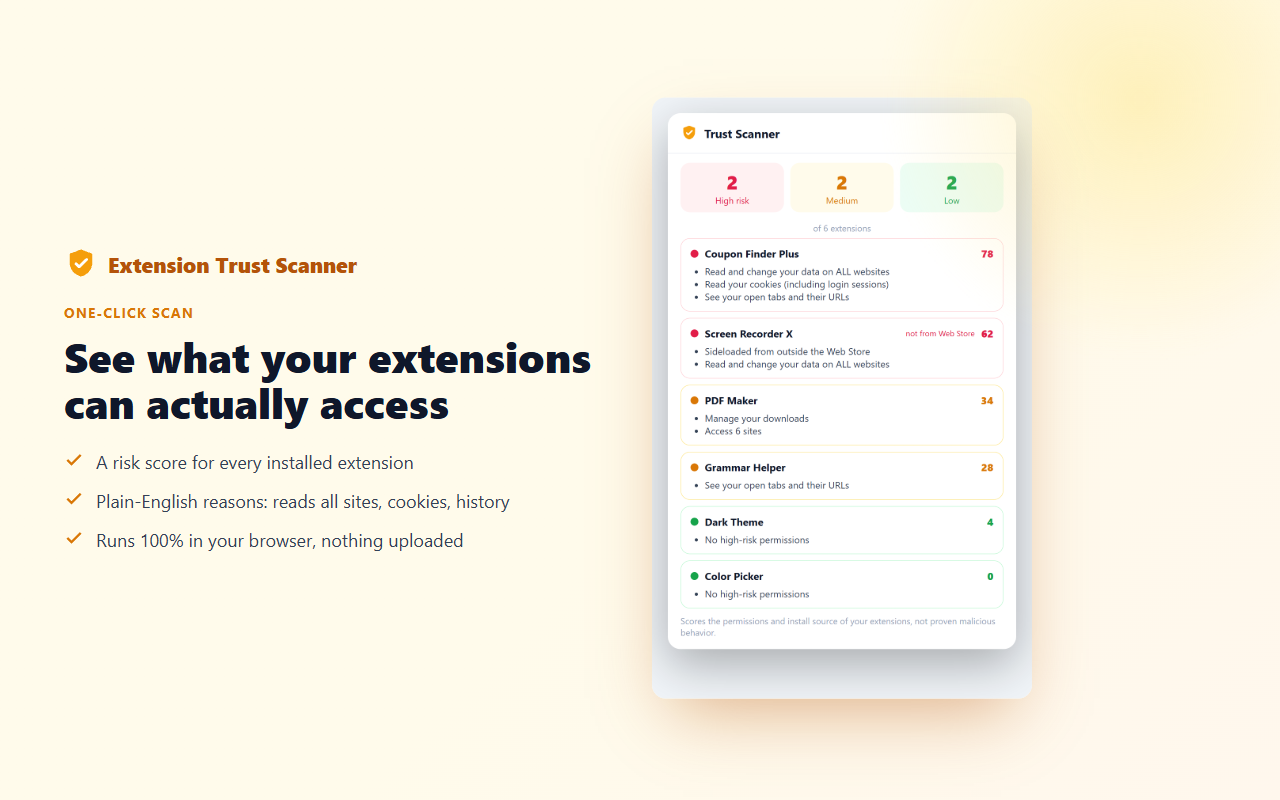
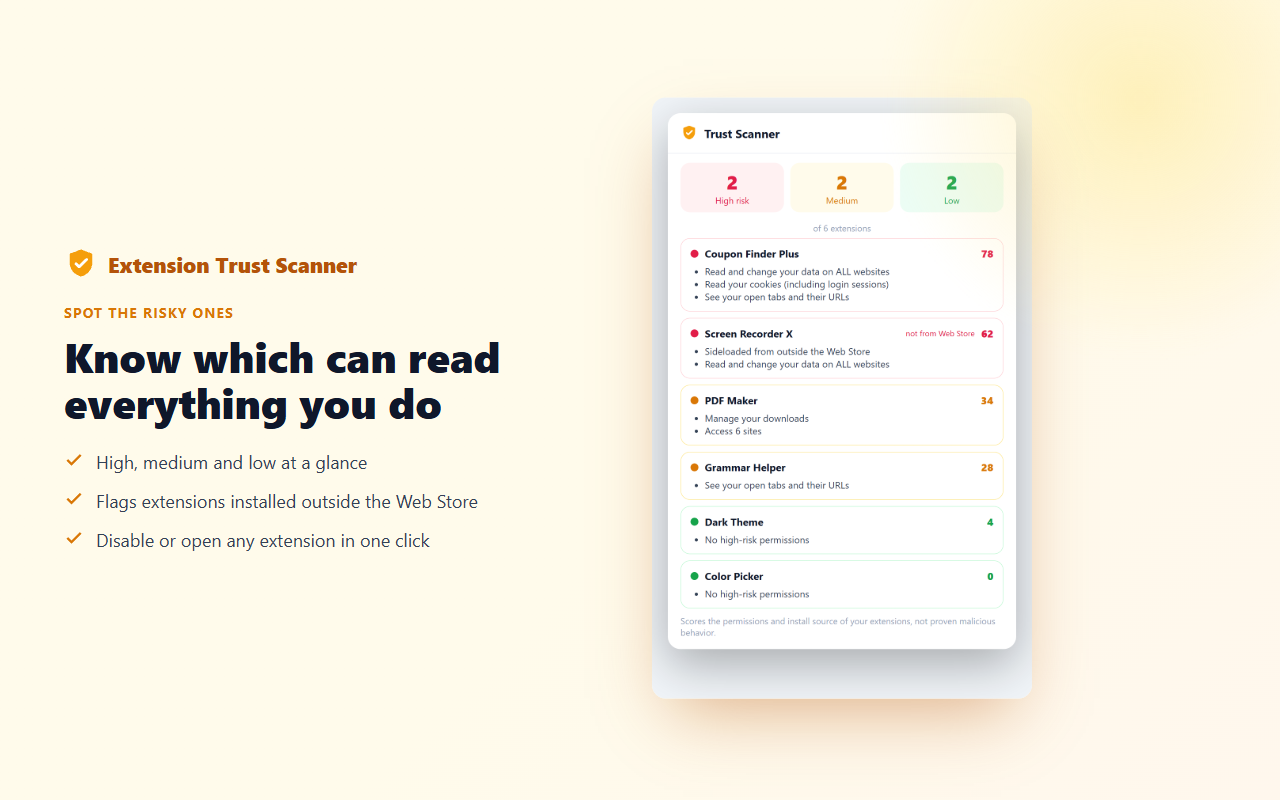
Extension Trust Scanner showing per-extension risk scores with plain-English reasons
100%
local scoring
0
extension list data uploaded
0-100
permission risk score
free
full scan, always

Most people never check what their extensions can see

In 2026, hundreds of extensions with tens of millions of installs were found harvesting browsing data from users who had no idea the extension had that access. Most people install extensions without looking at the permissions they declare. Extension Trust Scanner gives you a clear picture so you can make informed decisions about what stays and what goes.

Plain English, not legalese
Instead of "tabs", you see "can read the URL and title of every tab you open." You know immediately what each permission means for you.
Fully local
Your extension list is read by the browser's own management API. It never leaves your device. The scores are calculated locally, not on a server.
A starting point, not a verdict
A high risk score means powerful permissions, not wrongdoing. Use it to know what to review, not to panic.

How it works

1

Click Scan

Open the Extension Trust Scanner popup and click Scan. It reads your installed extension list via Chrome's built-in management API, entirely locally.

2

Review your scores

Each extension gets a 0-100 permission risk score. High-risk extensions appear first. Tap any extension to see its plain-English capability list.

3

Keep or disable

Decide which high-permission extensions you still want. Disable any one of them directly from the scanner with a single click, no trip to the extensions page needed.

Know your extension footprint

๐Ÿ”ข

Per-extension risk score

Each installed extension gets a 0-100 score based on the permissions it declared. Higher scores mean more powerful access to your browser and browsing data.

๐Ÿ’ฌ

Plain-language capabilities

Instead of raw permission strings, you see what they mean: "can read all websites you visit", "can read your cookies", "can capture what's on your screen."

๐Ÿšฆ

High / Medium / Low summary

At a glance, see how many extensions fall into each risk band. Prioritize your review by starting with the high-risk group.

๐Ÿ“ฆ

Non-Web Store flag

Extensions installed outside the Chrome Web Store (sideloaded) are flagged clearly. This is a significant install-source signal worth examining.

๐Ÿ”•

Disable in one click

Disable any extension directly from the scanner without opening Chrome's extensions page. Re-enable it anytime the same way.

๐Ÿ”

Deeper breakdown + change detection Pro

Per-permission scoring explanation, a historical log of new extensions added since your last scan, and exportable PDF or JSON reports.

Extension risk score list showing high medium and low bands Per-extension detail view showing plain-English capability list

What the risk score looks at

Scores reflect the permissions and install source the extension declared, nothing more. A high score means powerful permissions, not proven wrongdoing.

+30 pts

Can read all websites

The <all_urls> or broad host-match permissions let an extension read and modify any page you visit. This is the single highest-weight signal.

+20 pts

Can read your cookies

The cookies permission gives access to session cookies, which can be used to act as you on websites you are logged into.

+15 pts

Can capture your screen

The desktopCapture or tabCapture permissions allow recording what is visible on your screen or in browser tabs.

+10 pts

Can read all tabs

The tabs permission exposes the URL, title, and status of every tab you open, even in other windows.

+10 pts

Can read your browsing history

The history permission allows reading the complete list of sites you have visited.

+15 pts

Sideloaded from outside the Web Store

Extensions installed outside the Chrome Web Store bypass Google's review process. This is an install-source signal, not a behavior finding.

About what this tool can and cannot tell you

Extension Trust Scanner scores the permissions and install source that each extension declared, not proven behavior. Chrome does not allow one extension to read another extension's code, so we cannot inspect what an extension actually does with its permissions. A high risk score means the extension has powerful access, not that it is doing anything wrong. A low score is not a safety certification. Use these scores as a starting point for your own review, not as a final verdict. If an extension's permissions surprise you, check its developer's website, privacy policy, or reviews before deciding to keep or remove it.

Simple pricing

The full scan, all risk scores, and one-click disable are free, forever. Pro adds the power tools.

Free
$0
  • ✓ Full scan of all installed extensions
  • ✓ Per-extension 0-100 risk score
  • ✓ Plain-English capability list
  • ✓ High / Medium / Low summary
  • ✓ Non-Web Store extension flag
  • ✓ One-click disable / re-enable
Add to Chrome
PRO
Pro
$3/mo or $19/yr
  • ✦ Everything in Free
  • ✦ Per-permission score explanation
  • ✦ Change detection between scans
  • ✦ New-extension alerts since last scan
  • ✦ Exportable PDF and JSON reports
  • ✦ Priority support
Get Pro

Frequently asked questions

Does my extension list get uploaded anywhere?

Never. The scan reads your installed extensions using Chrome's built-in management API, which runs entirely locally. Your extension list, names, IDs, and scores are never sent to any server. The extension does contact our own server at peakproductivity.online for an anonymous license check and to send anonymous usage events (event name, random device id, version), and it sends any feedback text you choose to submit. None of these requests include your extension list or its details.

Does this detect malware? No, and it does not claim to.

Extension Trust Scanner is a permission risk awareness tool, not an antivirus or malware scanner. It scores the permissions and install source each extension declared, not what the extension's code actually does. Chrome does not allow one extension to read another extension's code. A high risk score means powerful declared permissions, not proven malicious behavior. A low score is not a safety certification. Use it as a starting point for your own review.

What is the difference between a high score and a dangerous extension?

A high score (roughly 60-100) means the extension declared permissions that give it broad access to your browsing. Many legitimate and popular extensions need those permissions to function, for example, ad blockers need access to all URLs to work correctly. The score helps you know what to review and what questions to ask, not what to delete.

What does "sideloaded" mean and why is it flagged?

A sideloaded extension was installed from outside the Chrome Web Store, meaning it did not go through Google's review process. This can happen through enterprise policy, developer mode, or third-party software installers. It is an install-source signal worth knowing about, not a finding of wrongdoing.

Will disabling an extension permanently remove it?

No. Disabling an extension suspends it without uninstalling it. You can re-enable it from Extension Trust Scanner or from Chrome's extensions page (chrome://extensions) at any time. Your extension's settings and data are preserved while it is disabled.

What is change detection in Pro?

Pro stores a snapshot of your extension list and scores each time you scan. On your next scan, it highlights any extensions that were added, removed, or whose permissions changed since the previous scan. This is useful for spotting unexpected additions, for example if software installed an extension without your knowledge.

Is Extension Trust Scanner itself listed in its own scan?

Yes. Extension Trust Scanner appears in its own scan results so you can review its own permissions the same way you review any other extension. It uses: management (to read the extension list), storage (to save settings and license status), downloads (to export reports), and a host permission for peakproductivity.online (for license verification, anonymous usage events, and optional feedback you submit).